

Team and permissions for your property management firm
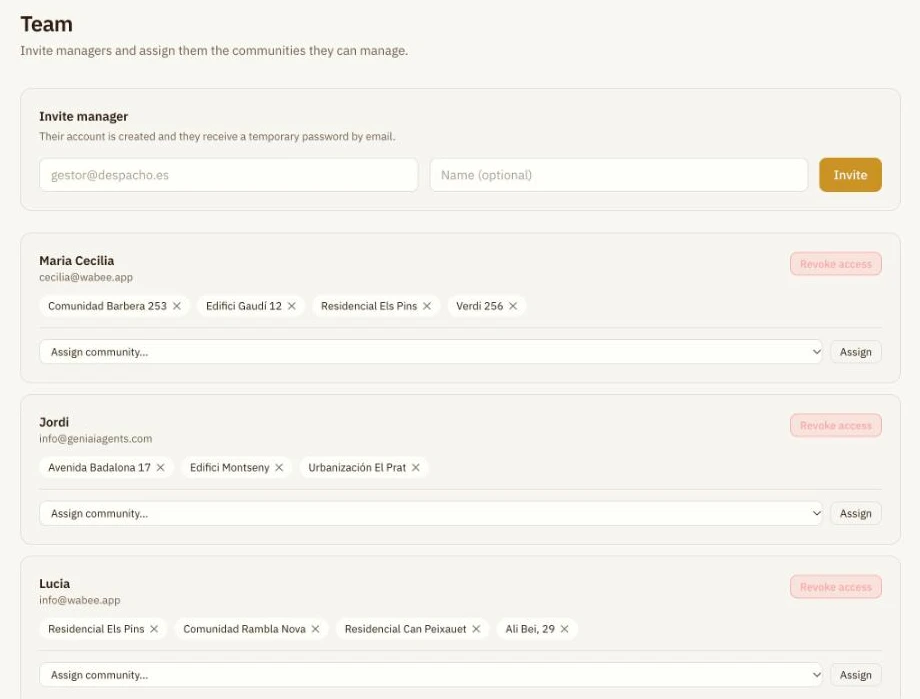
Invite your managers and assign each one their communities. Everyone logs in with their own account and only sees what's theirs.
Manager with access
4 communities assigned
Only sees what's theirs
Each manager, with their communities
- Everyone has their own account, not a shared password.
- A manager only sees their assigned communities.
- If someone leaves the firm, you revoke their access.
How it works
- 1
See who manages what
One screen shows your managers and each one's communities.
- 2
Invite a manager
Enter their email: their account is created and they receive a temporary password.

- 3
Assign their communities
Add or remove communities when the workload changes, or revoke access.

Frequently asked questions
What does a manager see?
Only their assigned communities. The limit is enforced in the database itself, not just on screen.
What about owners?
They have their own portal, separate from the firm's dashboard.
Can the chat bypass permissions?
No. The chat only reads the firm's data and, for a manager, their communities.
Who manages the team?
The firm's owner account.
See how to organise your team
30 minutes, no commitment.