

Migrate your property management firm's data from Excel
Import communities, owners, suppliers and leads from Excel or CSV, and check what's coming in before saving it.
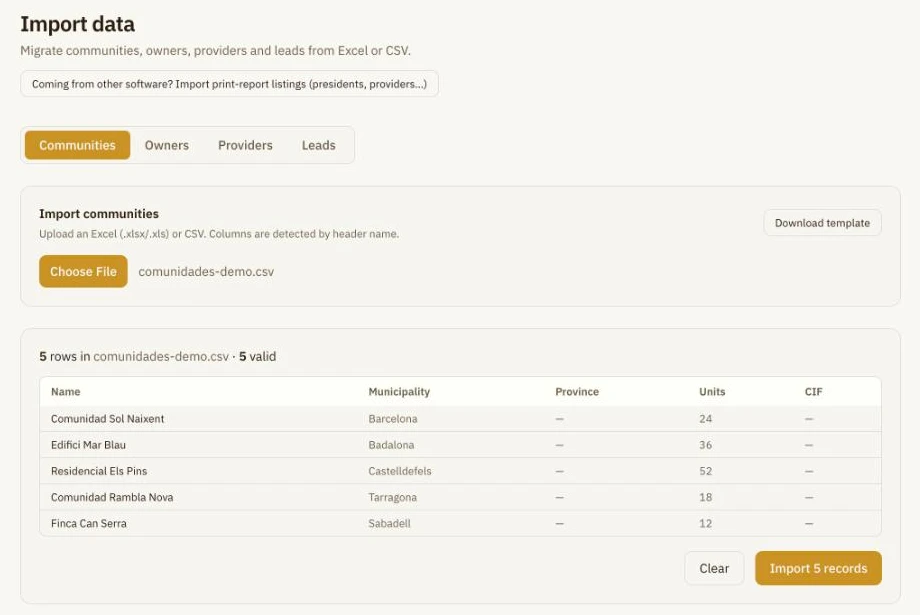
File checked
5 rows, 5 valid
Nothing is saved until you confirm
Switching software doesn't mean starting over
- Upload your files instead of retyping every community.
- See the valid rows before importing anything.
- It also accepts print-report listings exported by your previous software.
How it works
- 1
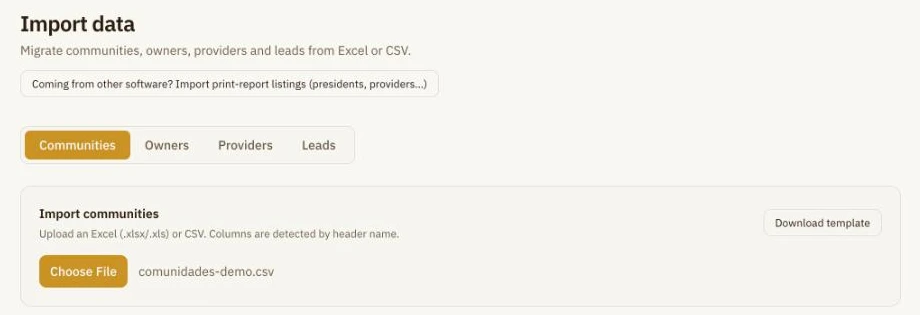
Upload your Excel or CSV
Choose what to import: communities, owners, suppliers or leads. You can download the template if you prefer.
- 2
Check before saving
Wabee detects columns by their header name and shows you the rows. If a record already exists, you choose what to do with it.
- 3
Bring your old listings too
Upload Excel listings from your previous software, such as presidents or suppliers per community, even if they are formatted as reports.

Frequently asked questions
Which formats are supported?
Excel (.xlsx, .xls) and CSV. Print-report listings are uploaded in Excel.
What about duplicates?
Wabee flags records that already exist and you choose what to do with each match. Duplicates within the file are skipped.
Do I need a template?
It's optional: columns are detected by their header. You can download one if you want.
Does it import accounting and invoices too?
No. This tool imports communities, owners, suppliers and leads.
See how to bring your data over
30 minutes, no commitment.